by Charles Oropallo | Feb 27, 2024 | Do-It-Yourself, Security, Technical Help, The CW Corner, WordPress
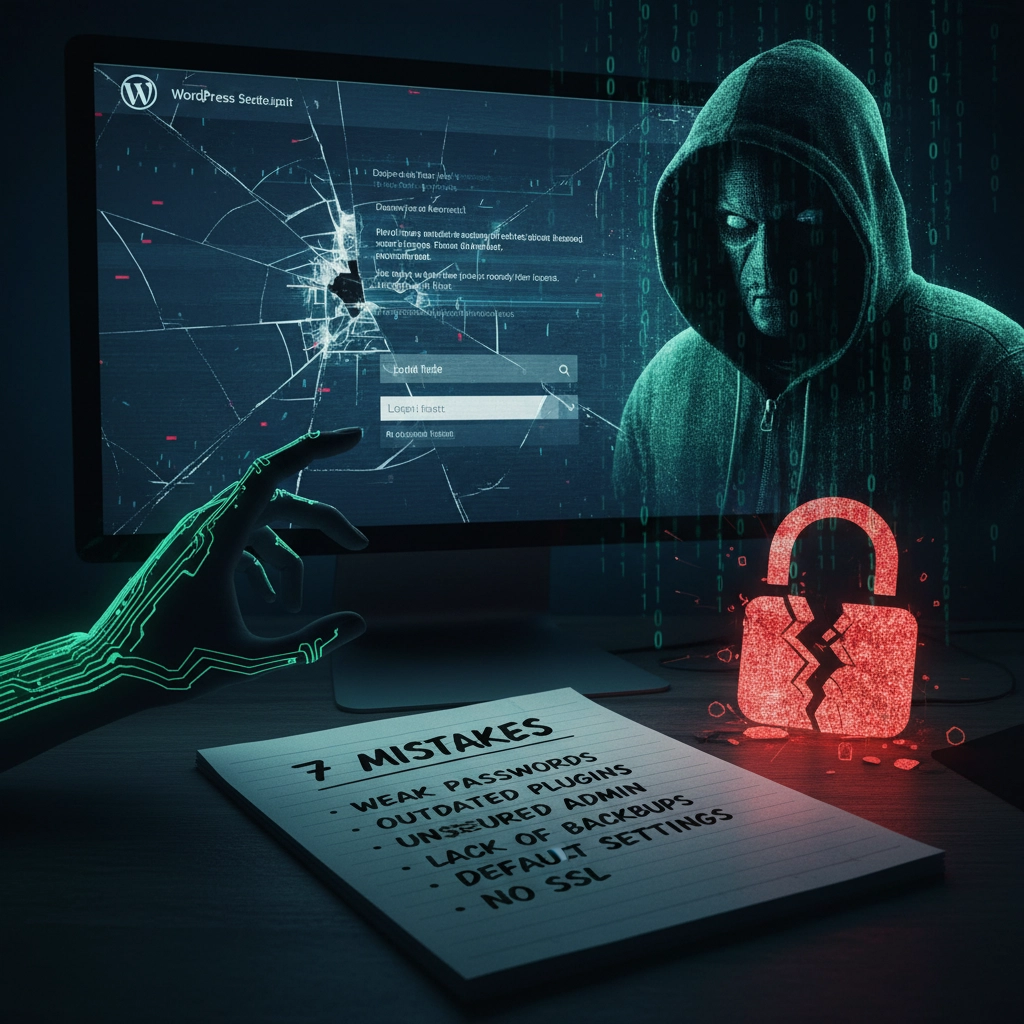
Think your WordPress site is secure? You might be shocked to learn that 97% of WordPress security problems stem from plugin vulnerabilities alone. Even worse, hackers know exactly which mistakes you’re making, and they’re counting on you to keep making them.
Don’t panic. Most WordPress security breaches happen because site owners unknowingly leave the digital equivalent of their front door wide open. The good news? These mistakes are completely preventable once you know what to look for.
Let’s dive into the seven most dangerous security mistakes that make your WordPress site an easy target for cybercriminals.
1. Running Outdated or Inactive Plugins
Here’s a scary statistic: only 30% of WordPress users have auto-updates enabled on their websites. That means 70% are sitting ducks for hackers who specifically target outdated plugins.
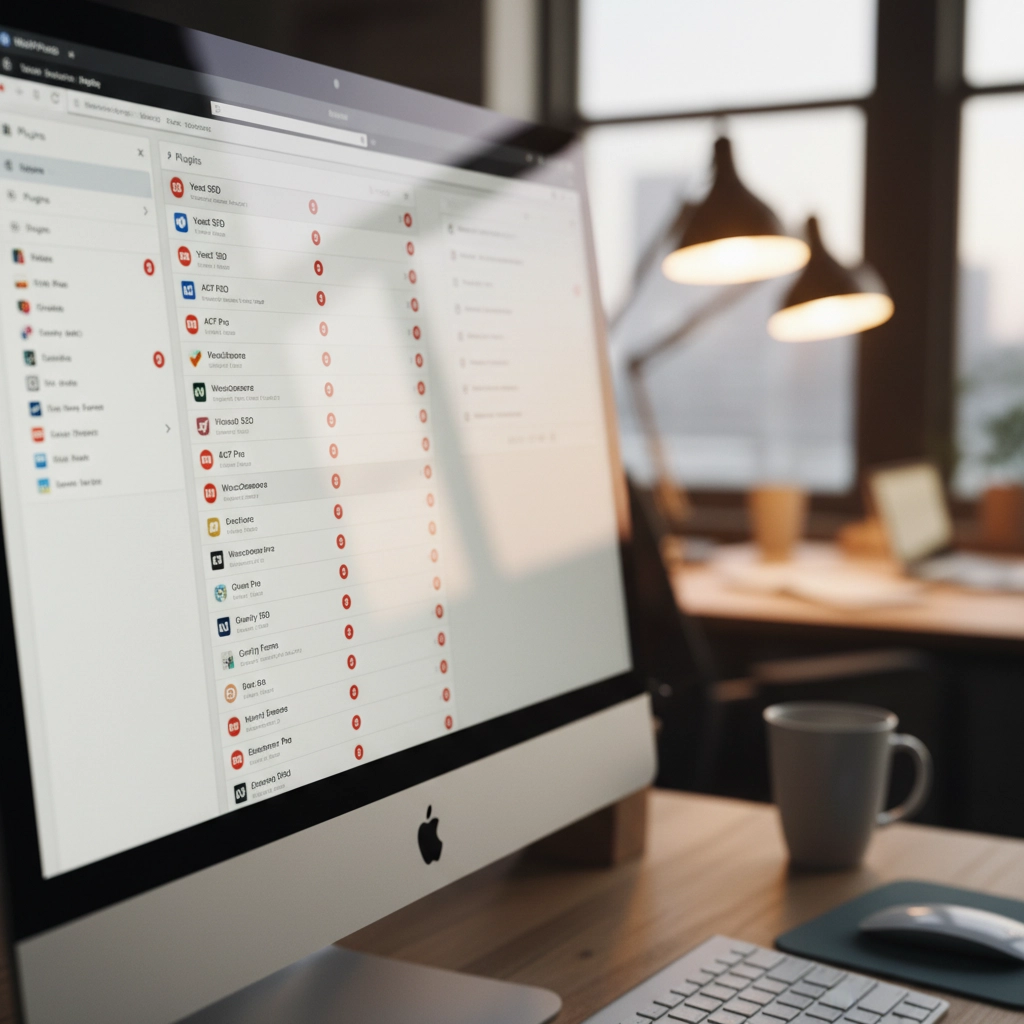
How Hackers Exploit This: Cybercriminals use automated scanning tools that crawl the web looking for sites running vulnerable plugin versions. When they find one, they already have the exploit code ready to go. It’s like leaving your house key under the doormat with a sign pointing to it.
Take the 2023 vulnerabilities in WP Fastest Cache and Essential Add-ons for Elementor. Thousands of websites running outdated versions became instant targets. Hackers didn’t need to be clever, they just needed to find sites that hadn’t updated.
The Fix: Enable automatic updates for plugins whenever possible. If you prefer manual control, check for updates weekly. More importantly, delete any plugins you’re not actively using. Inactive plugins are still attack vectors that hackers love to exploit.
2. Using Weak Passwords and Skipping Two-Factor Authentication
Here’s a reality check: 41% of WordPress users don’t use strong passwords or two-factor authentication (2FA). If your admin password is “password123” or your business name plus the year, you’re basically sending hackers an invitation.
How Hackers Exploit This: Brute force attacks are the digital equivalent of trying every key until one opens the lock. Hackers use bots that attempt thousands of login combinations per minute. Since WordPress allows unlimited login attempts by default, these bots can run 24/7 until they crack your password.
Once they’re in, they own your site. Customer data, financial information, email addresses, everything becomes theirs to sell or exploit.
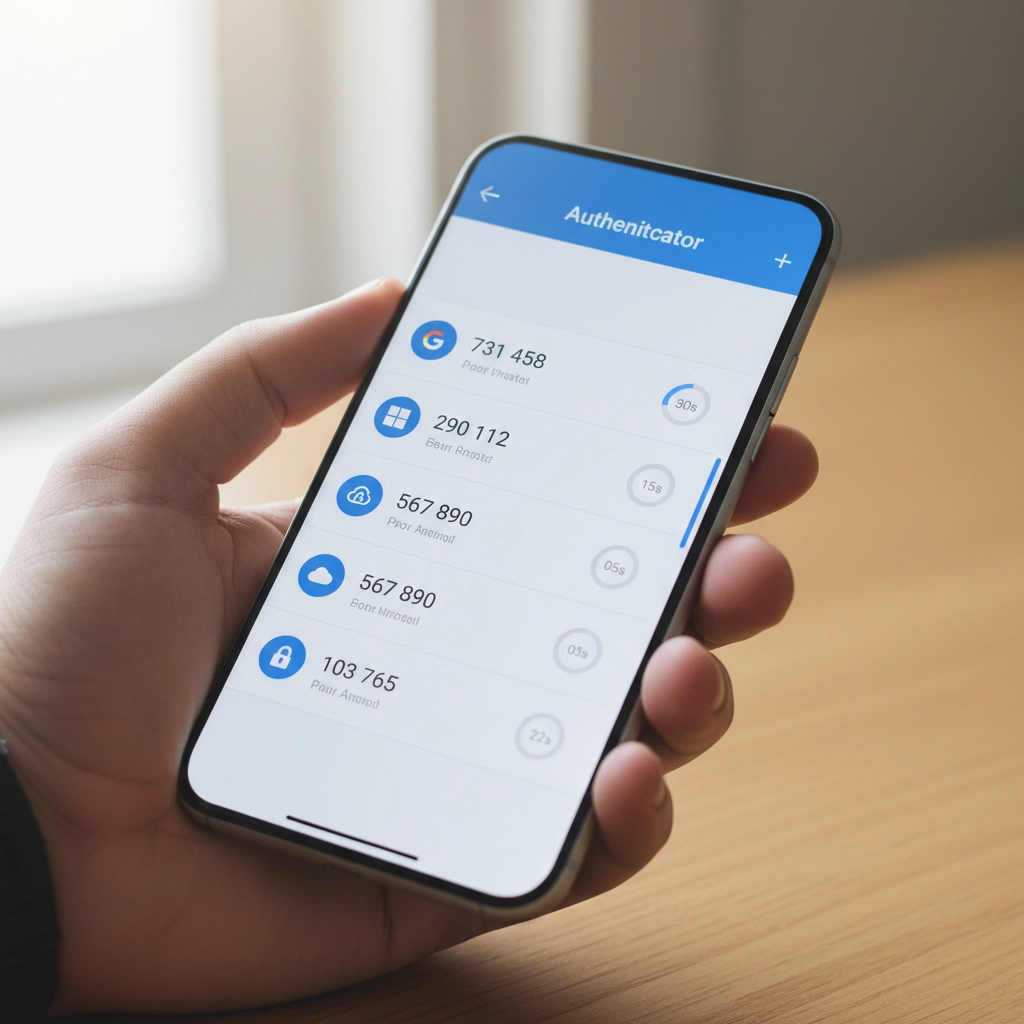
The Fix: Use passwords that are at least 12 characters long with a mix of letters, numbers, and symbols. Better yet, use a password manager to generate unique passwords for every account. Enable 2FA immediately, Google’s research shows it stops 100% of automated bot attacks.
3. Installing Plugins and Themes from Sketchy Sources
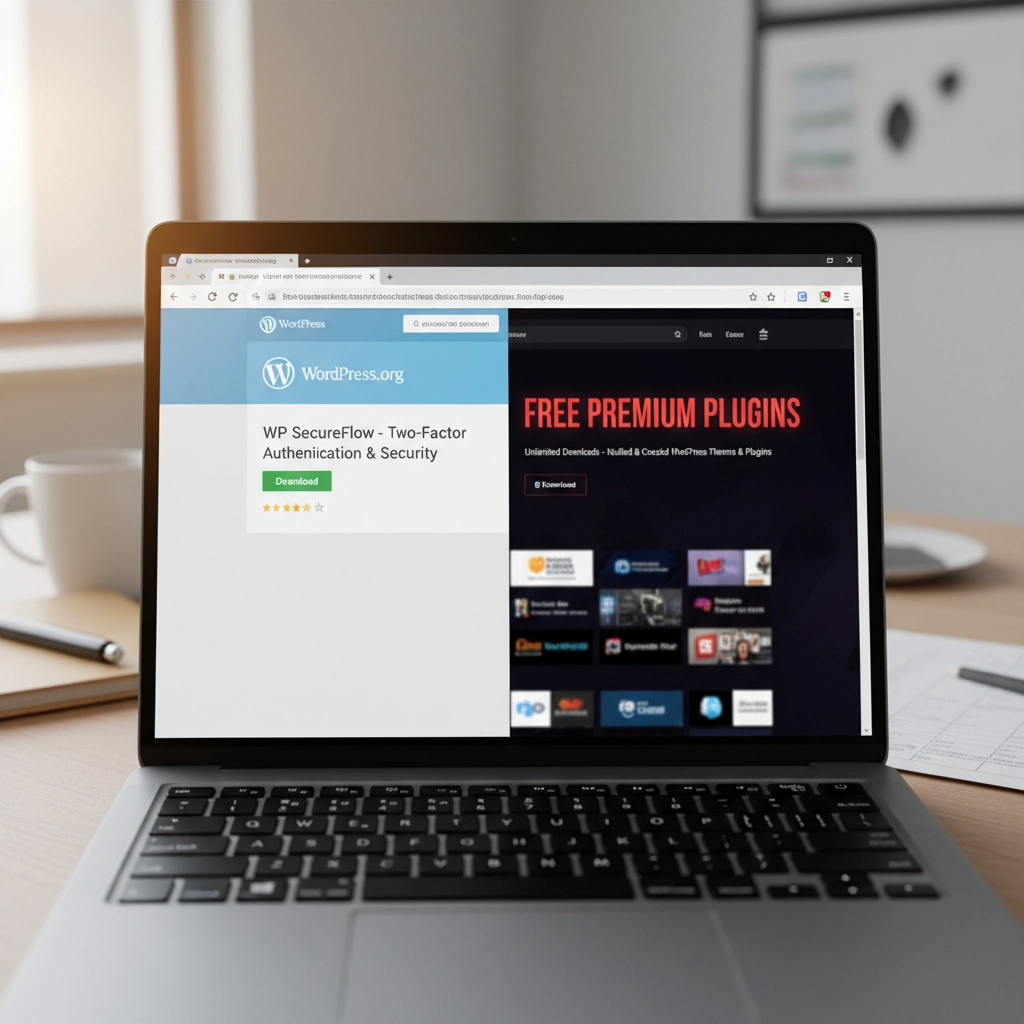
Free premium themes and plugins sound tempting, right? Those “nulled” versions of expensive plugins seem like a steal. Here’s the truth: if something seems too good to be true, it probably contains malware.
How Hackers Exploit This: Malicious developers embed backdoors directly into these “free” premium plugins. The moment you install them, hackers have a secret entrance to your site. Some plugin viruses are designed to automatically infect every other plugin and theme on your installation, spreading like wildfire through your entire WordPress setup.
These backdoors often go undetected for months, giving hackers plenty of time to steal data, inject spam links, or use your server for cryptocurrency mining.
The Fix: Stick to plugins and themes from WordPress.org, reputable commercial developers, or well-established marketplaces. Yes, you might pay more upfront, but it’s infinitely cheaper than dealing with a hacked website.
4. Ignoring File Permissions
File permissions might sound technical, but they’re basically your site’s security guard. When configured incorrectly, they’re like having a security guard who lets anyone walk into your building.
How Hackers Exploit This: Loose file permissions allow attackers to access sensitive files they shouldn’t see. Once they have limited access, they can often escalate their privileges and gain control of critical system files. It’s like giving someone permission to use your bathroom, and they end up with keys to your entire house.
With proper access, hackers can modify your site’s code, steal database information, or install persistent backdoors that survive even when you clean up other security issues.
The Fix: Follow the principle of least privilege. Files should be set to 644 permissions, directories to 755. Your wp-config.php file should be 600. If these numbers look like gibberish, ask your hosting provider to audit your file permissions.
5. Procrastinating on WordPress Updates
Those update notifications aren’t suggestions: they’re security bulletins. Every WordPress update includes patches for newly discovered vulnerabilities. When you ignore them, you’re essentially leaving known security holes open for hackers to exploit.
How Hackers Exploit This: WordPress developers openly publish what each security update fixes. This creates a roadmap for hackers who can easily identify which sites haven’t updated and target the specific vulnerabilities that remain unpatched.
It’s like fixing a broken lock on your front door but announcing to the neighborhood exactly when the repair will happen. Unpatched sites become obvious targets.
The Fix: Update WordPress core, plugins, and themes as soon as updates become available. Schedule a weekly maintenance window to check for and install updates. Most hosting providers offer staging environments where you can test updates before applying them to your live site.
6. Skipping Backups and Security Monitoring
Not having backups is like driving without insurance: you’ll only realize how crucial it is when disaster strikes. Similarly, running a WordPress site without security monitoring is like closing your eyes and hoping nothing bad happens.
How Hackers Exploit This: Without backups, when (not if) your site gets compromised, you have no clean version to restore. Hackers know this, which is why some attacks are designed to corrupt or encrypt your existing files, leaving you with no recovery options.
Without security monitoring, attacks can run undetected for weeks or months. During this time, hackers can steal customer data, inject malicious code, or use your site to attack other websites.
The Fix: Set up automated daily backups stored off-site (not on the same server as your website). Install a security plugin that monitors file changes, login attempts, and suspicious activity. For critical business sites, consider our email security services that include comprehensive monitoring.
7. Installing Software from Unknown Repositories
This mistake often flies under the radar but can be the most dangerous. Installing plugins or themes from forums, random websites, or commercial repositories outside the WordPress ecosystem introduces unknown code into your installation.
How Hackers Exploit This: Unlike WordPress.org plugins that undergo community scrutiny, third-party sources may lack any security review process. These repositories are often intentionally compromised or simply don’t have the resources to properly vet code.
Hackers exploit this by creating legitimate-looking plugins or themes that contain hidden malware. Once installed, these give attackers automatic access to your site without needing to break in through other methods.
The Fix: Stick to WordPress.org for free plugins and themes. For premium options, buy directly from the developer or established marketplaces like CodeCanyon. Never download “nulled” versions of paid plugins: they’re almost always infected with malware.
Your Next Steps
WordPress security isn’t rocket science, but it does require consistent attention. Start by auditing your current setup against these seven mistakes. Update everything, remove unused plugins, strengthen your passwords, and enable 2FA.
Remember, hackers are counting on you to make these mistakes. Don’t give them the satisfaction. A few hours of security maintenance now can save you weeks of cleanup later: not to mention the potential loss of business and customer trust.
Need help securing your WordPress site? We specialize in helping businesses protect their digital assets without the technical headaches. Your website is too important to leave to chance.


by Charles Oropallo | Dec 17, 2023 | Do-It-Yourself, Security, The CW Corner
Let’s be honest, you didn’t start your business to become a cybersecurity expert. You’ve got products to sell, customers to serve, and a bottom line to protect. But here’s the thing: spending hours wrestling with complicated security tutorials isn’t the answer.
The good news? Website security doesn’t have to eat up your entire weekend. With these seven practical hacks, you can lock down your site without needing a computer science degree. These aren’t theoretical tips, they’re battle-tested strategies that take minutes to implement but provide months of protection.
Think of this as your security cheat sheet. No fluff, no technical jargon, just straight-forward steps that actually work.
1. Turn On Multi-Factor Authentication (MFA) Everywhere
Here’s your first quick win: enable multi-factor authentication on every account that touches your business. This means requiring two forms of identification, like your password plus a code sent to your phone, before anyone can access your systems.
Why does this matter? Even if hackers crack your password, they still can’t get in without that second verification step. It’s like having a deadbolt and a security chain on your front door.

Set this up on your website admin panel, email accounts, social media profiles, and any business applications you use. Most platforms make this incredibly easy, usually just a toggle switch in your security settings.
Don’t skip this step because it seems like a hassle. The extra 30 seconds during login is nothing compared to the weeks you’d spend recovering from a breach.
2. Get That SSL Certificate Installed (And Keep It Updated)
If your website URL doesn’t start with “https://”, you’re broadcasting to the world that your site isn’t secure. Visitors see those dreaded “Not Secure” warnings, search engines penalize your rankings, and hackers see an easy target.
An SSL certificate encrypts data between your website and visitors. It’s like putting your conversation in a locked briefcase instead of shouting it across a crowded room.
Most hosting providers offer SSL certificates for free or under $20 per year. If you’re not sure whether yours is installed correctly, just look at your address bar. You should see a little lock icon next to your domain name.
Pro tip: Set a calendar reminder to check your SSL certificate renewal date. An expired certificate means your site goes back to showing security warnings, not exactly the professional image you want.
3. Schedule Monthly 15-Minute Security Checkups
Here’s where most business owners go wrong: they set up security once and forget about it. That’s like installing smoke detectors and never checking the batteries.
Instead, block out 15 minutes each month for a quick security review. During this time, scan for suspicious login attempts, check for broken or modified pages, and verify your backups are working.
You don’t need fancy tools for this. Most content management systems have built-in activity logs that show recent changes and user logins. Look for anything unusual, logins from strange locations, files you didn’t create, or pages that suddenly load slowly.

Think of this as preventive maintenance for your digital storefront. Catching problems early means fixing them takes minutes instead of days.
4. Enable Automatic Updates (Yes, Really)
“But what if an update breaks my site?” This fear keeps many business owners running outdated, vulnerable software. Here’s the reality: the risk of a hacker exploiting an old security hole far outweighs the small chance an update causes problems.
Software updates aren’t just about new features, they’re about patching security vulnerabilities that hackers actively target. Running outdated software is like leaving your keys in an unlocked car.
Enable automatic updates for your website’s core software, plugins, and themes. If your platform doesn’t support automatic updates, set weekly calendar reminders to install them manually.
Still worried about updates breaking things? That’s what backups are for (more on that in tip #6). The peace of mind from staying current on security patches is worth the occasional minor glitch.
5. Implement a Real Password Policy
“Password123!” doesn’t count as secure, no matter how many exclamation points you add. Weak passwords are like having a “Welcome” mat for hackers.
Create a simple password policy for your team: minimum 12 characters, mix of letters/numbers/symbols, and no reusing passwords across accounts. Better yet, use a password manager to generate and store complex passwords automatically.

Think about what’s connected to your email accounts, your website admin panel, and your business applications. One compromised password can unlock everything. Don’t make it easy for the bad guys.
If remembering complex passwords feels overwhelming, password managers like Bitwarden or LastPass do the heavy lifting. They generate random passwords and fill them in automatically, security made simple.
6. Set Up Automatic Backups and Vulnerability Scanning
Imagine losing months of work because your website got hacked or your server crashed. Now imagine getting everything back with the click of a button. That’s the power of automatic backups.
Configure daily backups of your entire website: files, database, everything. Store these backups off-site, not on the same server as your website. Many hosting providers include this service, or you can use plugins that backup to cloud storage.
Pair this with vulnerability scanning. Services like Sucuri or Wordfence automatically check your site for malware, outdated software, and security holes. They send email alerts when they find problems, so you can fix issues before hackers exploit them.
The goal isn’t to never have problems: it’s to bounce back quickly when they happen. Automatic backups and scanning give you that resilience without ongoing effort.
7. Audit Your Plugins and Third-Party Tools
Your website is only as secure as its weakest link. That forgotten plugin you installed two years ago might be full of security holes, giving hackers a backdoor into your site.
Conduct a quarterly audit of every plugin, integration, and third-party tool connected to your website. Ask yourself: “Do I actually use this? Is it from a reputable developer? When was it last updated?”
Delete anything you don’t actively use. For the tools you keep, enable security notifications so you know about vulnerabilities immediately. Subscribe to security blogs or newsletters from your plugin developers.
This includes seemingly harmless additions like social media widgets, analytics tools, and contact forms. Each one represents a potential entry point. The fewer doors you have, the fewer you need to guard.
The Bottom Line: Security as a Business Habit
These seven hacks work because they create multiple layers of protection without requiring constant attention. You’re not trying to become a security expert: you’re building good habits that run on autopilot.
The key is treating security like any other business routine. You wouldn’t skip payroll or forget to pay rent. Website security deserves the same consistent attention.
Start with multi-factor authentication and SSL certificates: these give you the biggest security boost for the least effort. Then work through the other tips over the next few weeks.
Your future self will thank you when you’re running a secure, professional website instead of dealing with the aftermath of a security breach. And your customers will appreciate knowing their information is safe in your hands.
Need help implementing any of these security measures? Our team at The CharlesWorks Corner specializes in making website security simple and manageable for busy business owners. Don’t let security concerns keep you up at night when practical solutions are just a click away.
by Charles Oropallo | Jun 30, 2022 | Do-It-Yourself, Email, Internet, Passwords, Security, The CW Corner, Website Updates, WordPress
We at CharlesWorks are often asked by our web clients if their site is protected from malware and getting hacked. They also want to know if there site IS hacked, whether there be a charge to fix it.
The totally hack-proof website
The totally hack proof website has no access to it. So it’s not connected to the Internet. No one can view it. Such a website doesn’t sound like its of much use if no one can see it.
So, let’s agree that it is unrealistic to believe that a publicly accessible website can be totally hack-proof. Any website that is accessible via the public Internet is consistently subjected to attempts to break into it. Believe it or not, that’s the norm as opposed to the anomaly.
That being said, however, there ARE things you can do to mitigate website hacks. I have to stress the word mitigate here. Mitigation is defined as the action of reducing the severity, seriousness, or painfulness of something.
Site hacks are based on odds
My goal here is to simply remind you of what you most likely already know: that we can reduce the probability – the odds – of your site being hacked. We at CharlesWorks want that probability to be so low that it hopefully it doesn’t ever happen to you.
The major hacking causes
I have been operating CharlesWorks since 1998. In my experience, there appear to be two major reasons why sites get hacked:
-
- The access credentials/passwords have been compromised.
- The software that operates them wasn’t kept up to date.
Lets take a look at each of these below.
Compromised Access Credentials
Compromised passwords and bad actors gaining access to website login credentials is the major reason we see sites hacked. Think about this in terms of your car. You could have alarms on it. But if you make a copy of your car key and give it to someone, they can do whatever they like with the car. Whether its a drive along the beach or to rob a bank, your car is theirs to use with the key you gave them. Credentials – log in and passwords – work pretty much the same way.
CharlesWorks has many clients who want to be able to do things themselves. We are strong proponents of doing it yourself when it’s feasible and convenient. This is especially true for adding posts or page materials. It also makes sense when making other changes or modifications to your site. It is, after all, YOUR website.
However, many people fall prey to phishing schemes. Directly or indirectly, they usually end up tricked into giving out their website access credentials (as well as credentials to everything else they own). This is especially true if your email account is hacked and the hackers are able to access emails containing your website’s (and other) login credentials.
This problem is exacerbated if you have shared your website’s administrative or other access with others. Think of your emails containing various authorizations or login information as a potential weak link in a chain. If you have shared that information with others you have now created more weak links. This increases the odds of a potential compromise.
One of the best ways to mitigate these situations is to change your site’s access passwords so they are different than those possibly stored in your emails. And, to hope that anyone you may have shared your website access with has done the same.
Obviously, should site access be gained in such a manner, it would be your burden to have the site restored. I’ll expound upon this a little more at the end of this article.
Out of Date Security/Software Updates
Malware and virus protection on home computers operates a little differently than the same types of protection on servers. Website servers operate in the publicly accessible Internet. This results in many more entry points for potential issues. There are a number of very standard server protections available (which we utilize here at CharlesWorks).
After bad actors getting (or guessing) your passwords, the next major reason sites get hacked surrounds unapplied security updates and other software update issues. At CharlesWorks we mitigate such issues by running anti-malware software on our servers. Also, WordPress sites hosted on our servers are kept up to date automatically via automatic updating of the WordPress core as well as automatic updating of the the website’s plugins and themes.
There are literally thousands of individual pieces of software that must work in unison to operate most websites. These are developed by many more thousands of developers around the world. Unfortunately, no company can guarantee that a website will never get hacked. They can only mitigate security compromises and hope against the worst.
Restoring your Website
Regardless of which of the two situations above may have led to your website’s issues, your website will most likely need to be restored. That’s because after a bad actor or a hack back doors into the site will most likely have been installed for the bad actors to gain access again.
Many Internet companies claim to have automatic backups. In most of those, those backups are accessible to the user in their account. If the account is hacked, how safe do you suppose that is?
Some Internet companies delete and account upon a website being hacked. In those cases I have seen many left with no website or backup as a result.
What I believe is most important regarding this topic is the manner in which our WordPress sites are backed up every day for 30 days. Our backups are made to separate servers – external to those your the site operates on. For security reasons, the site administrators do not have access to these backups. So even with a site administrator’s compromised passwords there is no access to the backups. With these backups we can usually restore an average site in about 10-30 minutes if it needs restoring. And we can go back as far back as 30 days. We would only bill our web client for the 10-30 minutes (again – for an average website) which results in only a minor charge to restore it. Note that some websites are extremely large and require much more time to restore but these are very rare).
In my experience running CharlesWorks since 1998, we’ve built and handled more than 5,000 websites. At this point in time, I do not recall the last time a website we built and totally maintained was hacked (unfortunately I recall several instances of sites maintained by others that failed to ensure the site was updated and/or had their passwords compromised).
Sites getting hacked for out of date software happens far less frequently (if at all) when security updates are kept up to date and bad actors are kept out.
I hope this helps you understand a little more about this topic.
by Charles Oropallo | Jul 4, 2021 | Do-It-Yourself, Security, The CW Corner, Website Development, Website Updates
Here we are at the 4th of July of 2021 already! The loss of life suffered in 2020 was horrendous. Yet there are people who still do not think in terms of helping their fellow citizens – and themselves – by being vaccinated. The vaccine misinformation mills are in full production.
So think about this: Exactly who benefits when we don’t vaccinate? When more of us are ill and can’t work, the economy suffers. There is no way the government wants that. They want us to all work so they can collect taxes from our labor. Enemies of America benefit when we don’t vaccinate. Who benefits when we do? We all benefit. The economy will return to normal – as will our lives.
At CharlesWorks we all chose to be vaccinated. Each of us employed here cares about ourselves and our clients. So when you make an appointment with us in person you can at least rest assured we have taken steps indicating we care about you.
The CharlesWorks policy is that the COVID unvaccinated need not apply. That is one of the many ways we show we care about others.
Vaccination will help us return to normalcy. It is a small thing to do. It is the patriotic thing to do. It is the right thing to do.
by Charles Oropallo | Dec 15, 2020 | Do-It-Yourself, Internet, Security, Technical Help, The CW Corner, Website Development, WordPress
Akismet provides a convenient and free way to protect your personal WordPress site or blog from spam.
Many times we’d like to allow comments to be left on our WordPress site. The hassle with this can be the tremendous amounts of spam that come through the forms on websites.
Akismet is a compact WordPress plugin that filters the incoming comments. It is pretty straightforward to use and pretty easy to set up as well.
Install the Akismet plugin
The first step in this process is to ensure that the Akismet plugin is installed in your WordPress website:
-
-
- Log into your WordPress website’s dashboard as an administrator
- Click on Plugins in the left dashboard navigation column
- Look and see if Akismet is listed – if it is – and it is not activated you can proceed to the Akismet Setup step below – otherwise
- Click on Add New under Plugins in the dashboard navigation column
- If you don’t see Akismet in the plugins, then in the text box to the right of the work Keyword in the row starting with Featured type in Akismet – then click on its Install Now button. Do not activate it yet.
Perform the Akismet Setup
To set up Akismet in your website, you will need an API code from the Akismet site. The first step in that process is to navigate to:
https://akismet.com/plans
This (as of the time of this writing) brings you to a page that should look similar to the screenshot below.
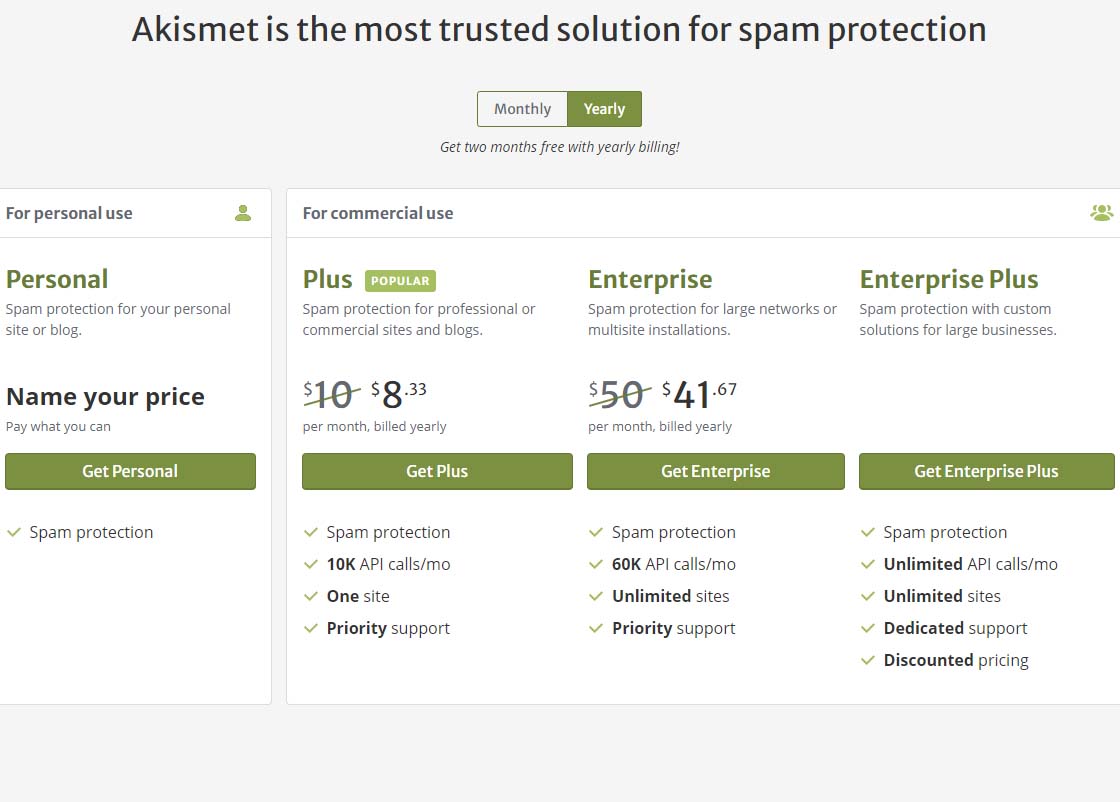 Akismet offering pricing page
To get the free version of Akismet comment spam protection, you will need to click on the Get Personal button on the above page.
Once you’ve done that, you should see a page similar to the one below. Before attempting to fill out anything on this page, we need to set that $36 / YEAR to $0 / YEAR. Click on the $36 / YEAR box and drag it to the left.
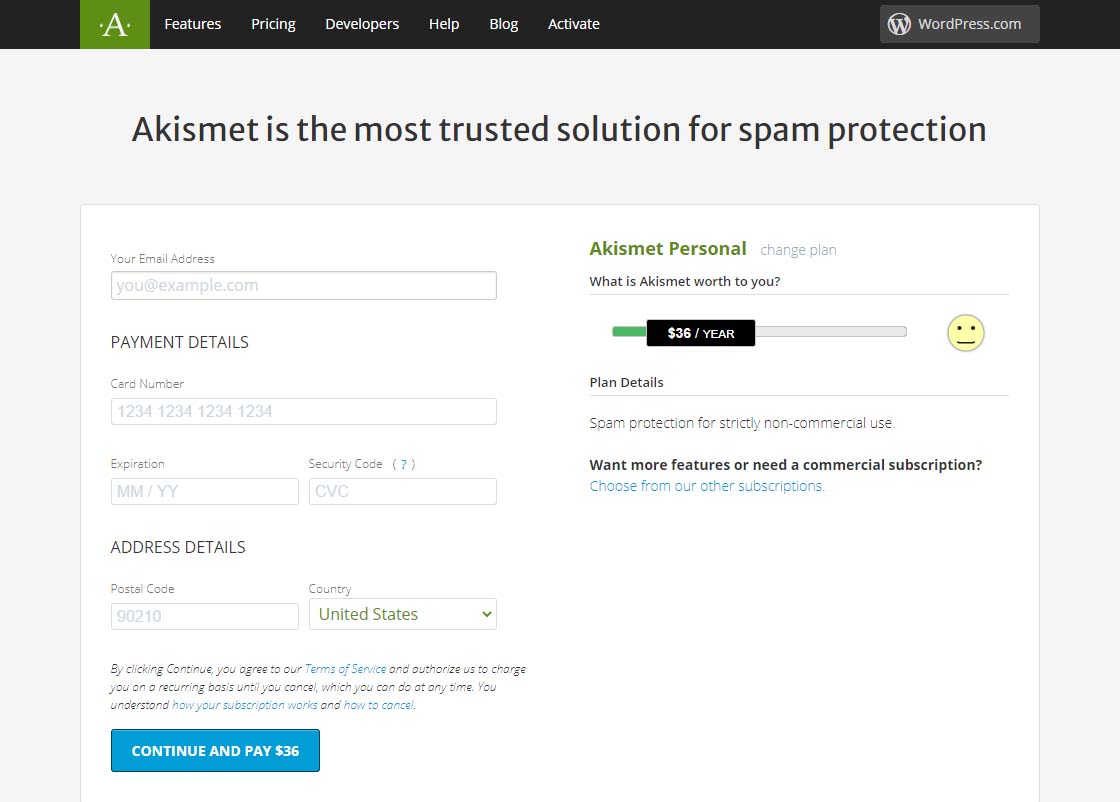 Akismet Default $36 per year page
Dragging that $36 / YEAR box to the left should change the page to display something like the one below showing 0$ / YEAR. You can also see that the information to fill in has changed.
Akismet $0 per year page
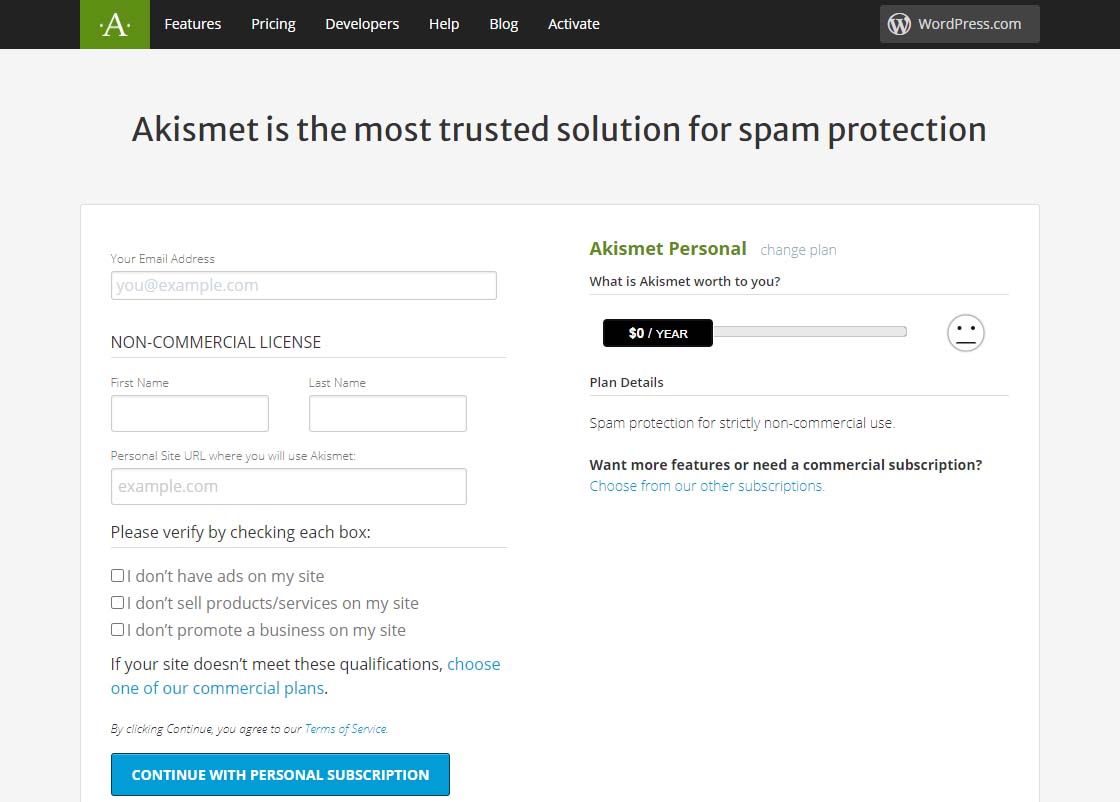 Akismet $0 per year page
Now fill in the information completely. Note that you need to be able to check all three checkboxes indicating the following:
-
-
- you don’t have ads on your site
- you don’t sell products/services on your site
- you don’t promote a business on your site
If these are the case, then you will qualify for a free, personal plan.
All you have to do once you have gotten this far is follow the directions on the page below.
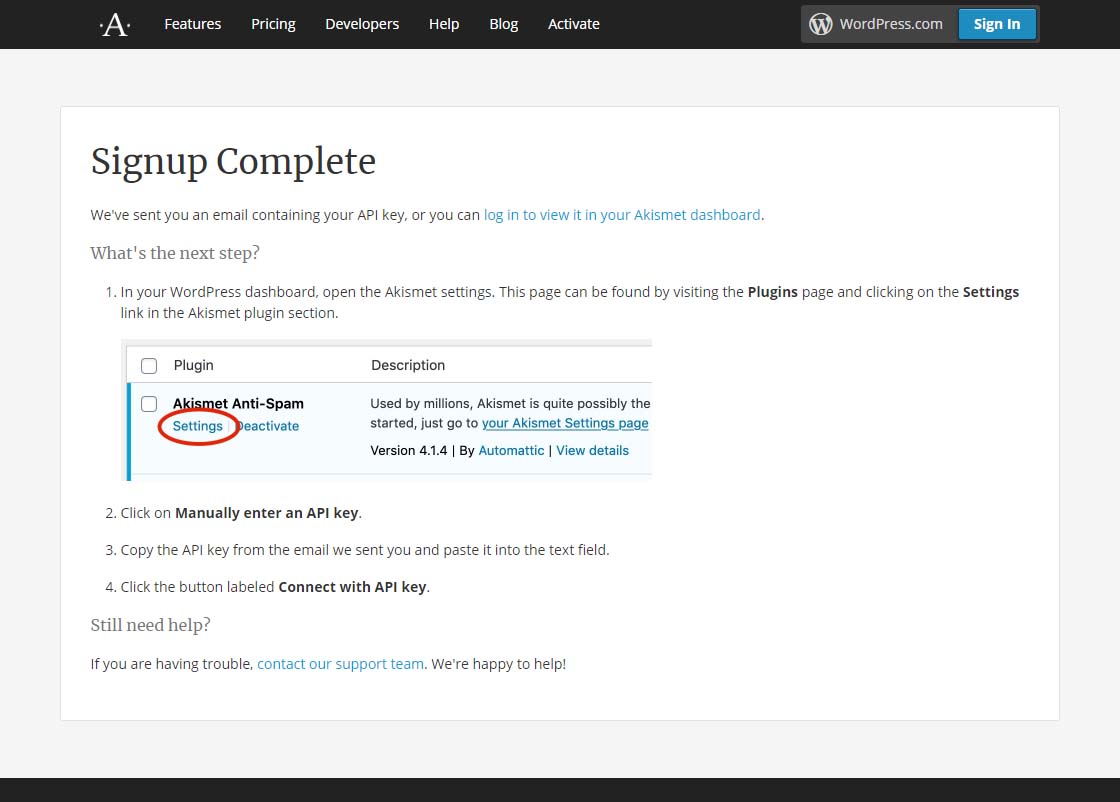 Akismet signup complete page
Finally, it is suggested that while on that settings page in Akismet, you can choose to show the number of approved comments beside each comment author and choose whether to show a privacy notice or not. Then just click the Save Changes button and you are on your way!
by Charles Oropallo | May 13, 2020 | Email, Internet, Monadnock Shopper News, Security, Shopper News, The CW Corner
The pandemic we are dealing with doesn’t always bring out the best in human nature. Such times are when scammers are more apt to take advantage of people. Many people are feeling anxious and helpless. Add economic issues and it’s clearly a recipe for depression and uncertainty.
Most small business owners have heard of PPP (Payroll Protection Program) loans. These are to help businesses stay alive and keep people employed during this pandemic. There are incredible numbers of scams involving PPP loans.
Most scams come through email. They also happen over the phone. Unbelievably, calls and email are great mediums for scammers. Emails trick people into loading viruses onto their computers. Both manipulate people into volunteering personal information! The result is identity fraud and/or account thefts.
Internet and telephone scams have one important factor in common: instill a sense of urgency in the mark. If the scammer can make you think you need to act on this right away, you probably will.
I suggest you:
1) Deal with bankers/lenders at respected institutions you actually know. Use the drive-through window if you must to set up an appointment.
2) Call your banker/lender if you get an email or phone call offering their help with the PPP loan – even if the email or phone call appears to be from a legitimate source.
3) Understand that emails and phone numbers can be spoofed – made to look like they’re from a legitimate source.
Be cautious and you won’t have to regret the unimaginable headaches that those who have suffered identity theft and other losses have experienced.










 European Union General Data Protection Regulation Compliant