
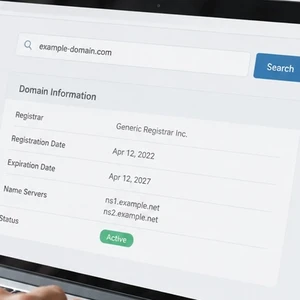
 A WHOIS lookup can help you understand who manages a domain and what registration details are publicly available. It’s useful when you’re choosing a web address, checking a suspicious message, or reviewing your own domain.
The name sounds technical, but the idea is simple. Think of WHOIS as a public directory of domain registration records. It can provide clues about a domain, although privacy protections often hide personal contact details.
What does WHOIS mean?
WHOIS is pronounced “who is.” It is not actually an acronym. The name reflects the question people ask: who is responsible for this domain?
Traditionally, WHOIS referred to tools and systems that shared domain registration information. Today, modern lookups generally use RDAP (Registration Data Access Protocol), a newer method for retrieving that information.
You do not need to understand the technology to use a lookup. The results appear as a list of details about a domain name.
The free ICANN (Internet Corporation for Assigned Names and Numbers) Lookup tool is an official place to start. Enter a domain name and review the results.
What can a lookup show?
A WHOIS or RDAP lookup may display several kinds of registration information. The exact results vary by domain ending, registrar, and privacy settings.
- Registrar: The company officially listed as managing the domain registration.
- Registration and expiration dates: When the domain was registered and when its current registration period ends.
- Name servers: Services that help direct the domain’s website and email to the correct locations.
- Status codes: Short labels describing restrictions or other domain conditions.
- Registrant contact details: Information about the person or organization that registered the domain, when publicly available.
A registrar is the company through which a domain is registered. It is not always the same company that hosts the website.
A name server is like a signpost. It helps guide visitors’ browsers and email systems toward the right online services.
A status code such as clientTransferProhibited can indicate that a registrar has restricted domain transfers. The label may look cryptic, but it generally describes a setting or status, not a warning that your website is unsafe.
Will it show your name and address?
Usually, not all of them. These days, many domain records hide or redact personal contact information through privacy services or registration-data redaction.
Instead of your home address, phone number, or email, a lookup might show a privacy service or a note saying that information is unavailable. The exact display depends on the domain and its provider.
That privacy is helpful, especially if you registered a domain for a small business from home. Still, do not assume every detail is hidden. Check your own record and ask your registrar what privacy options are available.
Also remember that a lookup is not a complete identity check. Public records can be masked, outdated, or limited. Treat the information as a useful clue, not proof of who controls a website.
Why should a small-business owner care?
A domain is part of your business identity. It may connect your website, business email, and customer communications.
A quick lookup can answer practical questions before a small issue becomes a confusing one. Here are a few situations where it helps.
You want to buy a domain
Search the name you want through ICANN Lookup. If the result shows an existing registration, someone has registered that domain, even if its website appears blank.
If no registration record appears, the name may be available. Confirm through a registrar’s domain search before making plans. Availability can change, and the lookup alone does not reserve a name.
Also check similar spellings before settling on a business address. A small typo can send customers somewhere else.
A strange email mentions a website
Suppose you receive an unexpected message claiming that a familiar company’s website is unsafe or that you must pay through a new website. Look up the domain mentioned in the message.
Review its registration date, registrar, and any available contact information. If it appears unrelated to the company, newly registered, or inconsistent with what you already know, slow down.
A lookup cannot prove that a message is fraudulent. Scammers can also use established domains or imitate legitimate businesses. But the results can give you another reason to verify the message independently.
Do not click a suspicious link to investigate. Visit the organization’s known website directly or contact it using details you already trust.
A renewal notice seems questionable
Some renewal notices are legitimate. Others may try to steer you toward a different provider or collect payment under pressure.
Check the registrar listed in your domain’s lookup. Then sign in by entering that company’s known web address yourself, rather than following an unexpected payment link.
One detail can be confusing: a domain may have been purchased through a reseller. The registrar shown in the lookup may differ from the company that sends your invoice or provides support. If the names do not match, ask your web provider or registrar to explain the relationship.
Be especially cautious if a message demands immediate payment or claims your domain will disappear unless you use its link. For more on questionable domain notices, see our guide to another domain scam.
You want to check your own domain
Look up your business domain and compare the results with your records. Check which registrar appears, review the expiration date, and confirm that the listed name servers look familiar.
If the registrar is unfamiliar, do not panic. A website developer, hosting provider, or reseller may have helped register the domain. Ask who manages it and how you can access the account.
If the name servers look unfamiliar or your website and email have stopped working, contact the provider responsible for your domain or website. Avoid changing settings until you know what each setting controls.
A quick check you can do now
This simple check should take only a few minutes:
- Open ICANN Lookup.
- Enter your domain name and view the registration results.
- Note the registrar and expiration date.
- Check whether the name servers match information from your web or email provider.
- Review any contact information that is visible.
- If something looks wrong, contact your registrar through its official website.
Keep a note of the registrar and the provider that handles your website. Store it somewhere you can find later, not on a mystery sticky note attached to your monitor.
ICANN’s guide to WHOIS and registration data services offers further background. For most everyday checks, though, the lookup tool and your registrar’s account are sensible starting points.
Keep the results in perspective
WHOIS and RDAP records are helpful, but they do not explain every part of your online setup. The registrar manages the domain registration; another company may host your website or email.
A lookup can help you spot mismatched details, confirm who is listed as registrar, or investigate an unfamiliar domain. It cannot tell you whether a website is trustworthy just by itself.
Check the source of unexpected messages, confirm important details directly with your provider, and ask questions when the records do not make sense. That is a practical way to keep your domain information from becoming a mystery.
If you would like help checking or managing a domain, The CW Corner is here to help. CharlesWorks has built websites and managed hosting from New Hampshire since 1998. We’re happy to help you make sense of your domain details.









 European Union General Data Protection Regulation Compliant